
需要安装 git python 3.12 否则闪退哦
首先进行NVM安装
https://github.com/coreybutler/nvm-windows/releases
nvm下载加速:https://bgithub.xyz/coreybutler/nvm-windows/releases
安装(此处安装版本更具最新的版本来可能是22.22.2 下面使用的版本必须相同)
nvm install 22 # 使用指令
nvm use 22.22.1Powershell,右击管理员方式打开 执行
Set-ExecutionPolicy RemoteSigned -Scope CurrentUser选择Y

设置国内node源
npm config set registry https://registry.npmmirror.com在执行安装命令
iwr -useb https://openclaw.ai/install.ps1 | iex
安装好就进入设置,如果关闭必须重新设置,下面是设置的代码。
openclaw onboard --flow quickstart

openclaw onboard --install-daemon

#NPM安装选下面一个

#NPM安装
npm install -g openclaw

#[错误1 表示要先卸载之前的安装再清理缓存,下面有步骤]安装插件
openclaw plugins install @m1heng-clawd/feishu
可能失败但是对策
应对闪退,没有信息跳出请使用:
iwr -useb https://openclaw.ai/install.ps1 -OutFile "$env:Desktop\install.ps1"

#然后执行

& "$env:Desktop\install.ps1"

#查看具体闪退信息
配置:切换大模型【Qwen家目前不要钱】
openclaw config安装SKILL 【ZIP安装 记得安装pip包】
安装Clawhub.ai 首先
npm i -g clawhub在Clawhub上找到需要的SKILL然后执行下载
clawhub install 名称
比如下面的WPS的skill https://clawhub.ai/lilei0311/wps-office 名称就是最后的wps-office
clawhub install wps-office该命令用于清楚缓存
clawhub clear cache
使用ZIP安装 下载zip 解压保存在skill文件夹
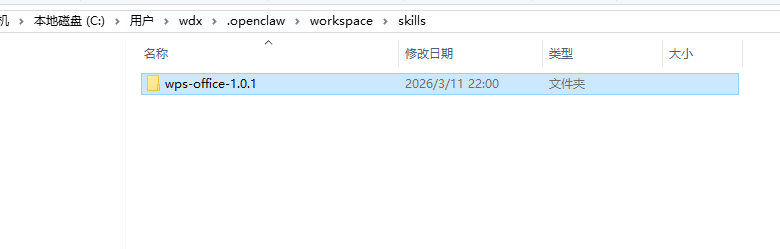
在你的SKILL中有个workspace里面有 有些需要安装其他有的服务pip可能不显示
重启网关
openclaw gateway restartpython下pip使用阿里云的节点
pip config set global.index-url https://mirrors.aliyun.com/pypi/simple/使用openclaw方法
使用akshare-stock 分析601138近期股价及财务数据 ,并更具你分析的信息推测未来一周内的股价,及其概率
# 必须在对话里面明确调用的SKILL名称才能使用。
通讯飞书
插件plugins 安装方法如下
openclaw plugins install @m1heng-clawd/feishu
目前已经集成飞书
使用openclaw config 重新配置即可
选择channels
open.feishu.cn 登入 创建应用》添加应用能力【机器人】

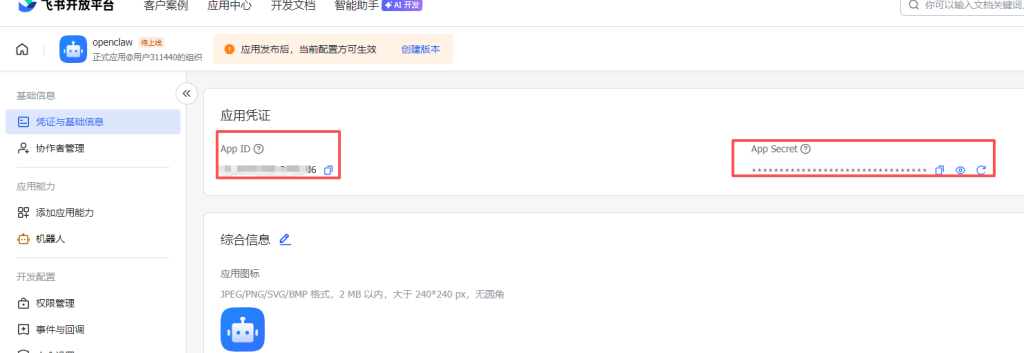
在权限中”批量导入权限“导入下面的JSON
{
  "scopes": {
    "tenant": [
      "aily:file:read",
      "aily:file:write",
      "application:application.app_message_stats.overview:readonly",
      "application:application:self_manage",
      "application:bot.menu:write",
      "cardkit:card:write",
      "contact:user.employee_id:readonly",
      "corehr:file:download",
      "docs:document.content:read",
      "event:ip_list",
      "im:chat",
      "im:chat.access_event.bot_p2p_chat:read",
      "im:chat.members:bot_access",
      "im:message",
      "im:message.group_at_msg:readonly",
      "im:message.group_msg",
      "im:message.p2p_msg:readonly",
      "im:message:readonly",
      "im:message:send_as_bot",
      "im:resource",
      "sheets:spreadsheet",
      "wiki:wiki:readonly"
    ],
    "user": [
      "aily:file:read",
      "aily:file:write",
      "im:chat.access_event.bot_p2p_chat:read"
    ]
  }
}
上面的图片中 顶部的 ”创建版本“ 发布即可
然后需要在openclaw中设置id和key

在openclaw里面配置后,飞书事件配置
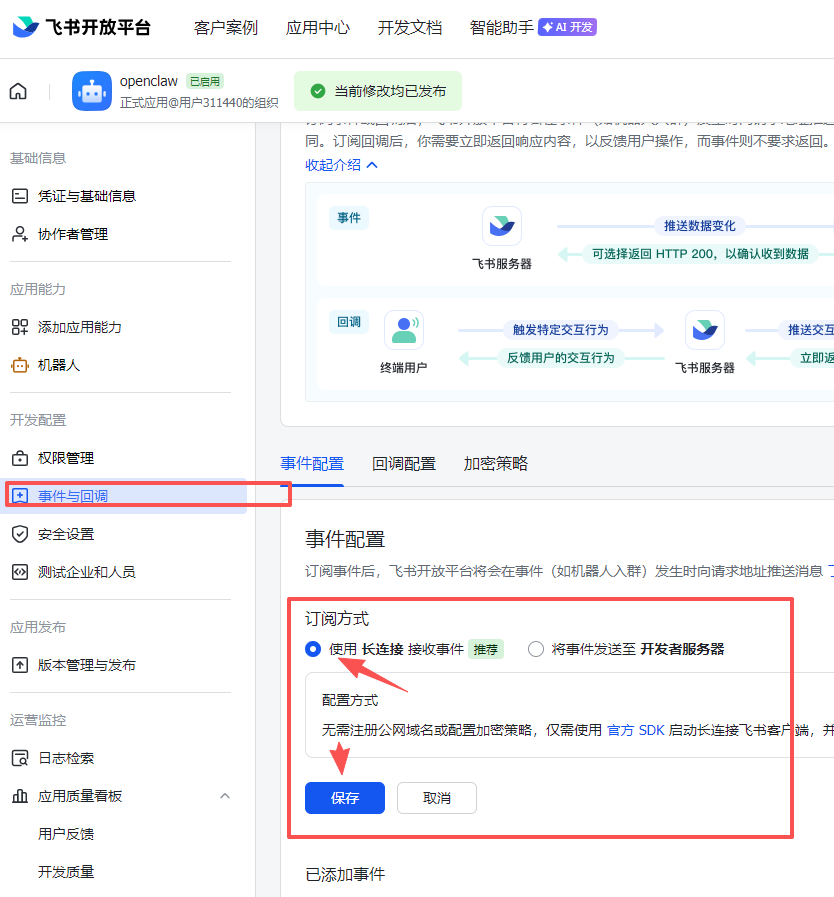
选择
已添加事件 – 消息与群组
已添加事件 – 身份验证
已添加事件 – 通讯录
全选

需要重启网关
openclaw config set channels.feishu.dmPolicy open

openclaw gateway restart
启动openclaw 电脑关机后启动服务
openclaw gateway startOllama本地化LLM
安装最新的ollama,使用ollama pull下载模型 必须是最新的模型qwen3.5,不然无法支持openclaw的tools
ollama launch openclaw然后在页面中选择你要使用的服务即可!
安装失败:
node.exe : npm error code 128 网络问题,因为需要使用github大概率有问题
node.exe : npm error code 1 已经安装过一次了需要卸载
npm cache clean –force
npm uninstall -g openclaw
NPM安装失败

git config --global url."https://github.com/".insteadOf "ssh://git@github.com/"

#修改GIT中安装时候使用SSH 改为HTTPS【默认需要安装openclaw 包依赖的 libsignal-node 库使用了 SSH 协议】,再执行安装命令。
npm install -g  openclaw
网关令牌缺失
安装完成后会自动跳转到浏览器,如果没有跳转直接打开http://127.0.0.1:18789 会显示网关令牌缺失。请使用命令行生成带有验证的链接 openclaw dashboard
code 128 使用镜像替换
git config --global url."https://bgithub.xyz/".insteadOf "https://github.com/"
git config --global url."https://bgithub.xyz/".insteadOf "git@github.com:"
code 128 有时候也可以通过重复安装完成,主要看你网络,清晨 几率高一点